Measuring Accessibility, Speed, and Tracker Load
Overview
Measuring website accessibility, speed, and tracker load solves a precise systems problem: a page can appear functional while excluding assistive-technology users, delaying interaction, or transferring unnecessary third-party code. These qualities are coupled at runtime. A script that inserts consent controls may affect keyboard focus; a large third-party tag may delay input handling; a visual redesign may improve load time while reducing text contrast. A useful measurement process therefore treats the page as an executed system, not as a static set of files.
The goal is not to produce a single score. Accessibility is judged against requirements such as Web Content Accessibility Guidelines (WCAG) success criteria; speed is measured through user-centric timing metrics and resource costs; tracker load is inferred from network, storage, script execution, and cross-origin behavior. A correct measurement model separates normative conformance, observed runtime performance, and policy choices about third-party behavior. Combining them in one audit is valuable because the same browser session can collect DOM, accessibility tree, performance timeline, request, cookie, and storage evidence.
How it works
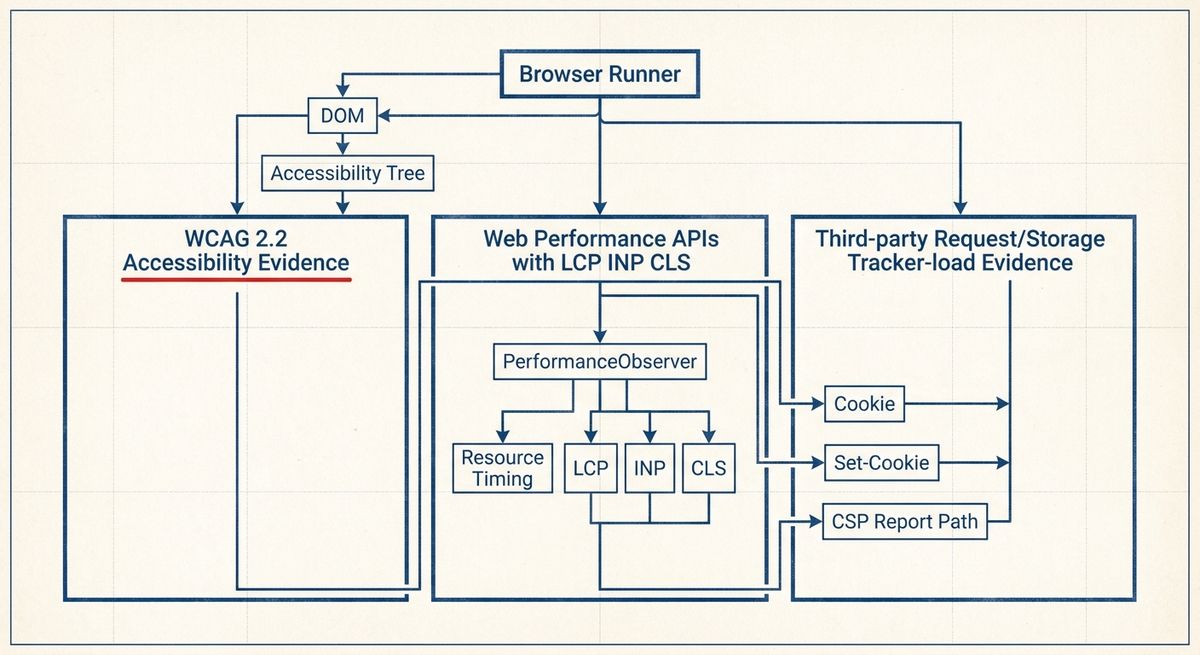
At the systems level, measurement begins with a controlled browser run. The runner opens a URL in a known viewport, network profile, language, and browser configuration; records navigation, redirects, response headers, resource timings, JavaScript execution signals, layout shifts, and user interactions; then repeats the run to reduce cache and network noise. For field measurement, the page itself can use the PerformanceObserver interface to observe supported entries such as largest-contentful-paint, layout-shift, event, navigation, resource, and longtask, subject to browser support and privacy limits.
Accessibility measurement has two layers. Automated checks inspect the parsed HTML, computed styles, ARIA attributes, form labels, focus order signals, image alternatives, heading structure, and name computation. Manual or scripted interaction then verifies requirements that automation cannot fully determine, such as whether link purpose is clear in context, whether error suggestions are meaningful, and whether focus remains visible during a task. The relevant runtime object is not only the DOM; it is also the accessibility tree produced from HTML, ARIA, CSS, and platform accessibility mappings.
Tracker-load measurement is primarily a network and execution classification problem. The runner records every request URL, initiator, response type, transfer size, execution cost, cookie mutation, storage access, and whether the destination is same-site or cross-site. Third-party status is not identical to tracking: a font, map, analytics endpoint, or embedded video may all be cross-origin, but tracking inference requires evidence such as persistent identifiers, Set-Cookie headers, fingerprinting-like script behavior, known tracker-list membership, or repeated cross-site requests. A defensible report therefore shows the raw evidence and the classification rule used.
The panel below runs exactly these three measurement passes over a real sample: 29 US hospital and health-system homepages, each fetched once over HTTPS and scored only on the raw signals its delivered HTML exposes. The pattern is consistent. 28 of the 29 declared at least one third-party analytics or tracking origin, the median homepage referenced 15 distinct third-party domains, and only 10 surfaced any cookie-consent signal. Structural accessibility was uneven in a different way: 27 declared a document language and 28 set a viewport, but only 20 exposed a main landmark and 6 shipped no first-level heading at all. Switch the active dimension to watch one neutral posture reorder the entire sector.
- 01Northwestern Medicine41/1003rd-party25trackers3pre-cookies2
- 02Stanford Health Care53/1003rd-party16trackers2pre-cookies4
- 03Banner Health57/1003rd-party16trackers1pre-cookies4
- 04Cleveland Clinic59/1003rd-party16trackers1pre-cookies8
- 05Ochsner Health61/1003rd-party16trackers2pre-cookies0
- 06Mount Sinai62/1003rd-party18trackers1pre-cookies0
- 07Nationwide Children's Hospital63/1003rd-party9trackers2pre-cookies4
- 08UPMC64/1003rd-party18trackers1pre-cookies4
- 09Vanderbilt University Medical Center65/1003rd-party16trackers1pre-cookies0
- 10Tampa General Hospital67/1003rd-party13trackers0pre-cookies3
- 11Massachusetts General Hospital68/1003rd-party11trackers1pre-cookies2
- 12UCLA Health70/1003rd-party11trackers1pre-cookies1
- 13Emory Healthcare70/1003rd-party12trackers0pre-cookies2
- 14Houston Methodist71/1003rd-party13trackers1pre-cookies4
- 15Baptist Health72/1003rd-party9trackers0pre-cookies3
- 16Mass General Brigham72/1003rd-party12trackers0pre-cookies1
- 17Brigham and Women's Hospital73/1003rd-party10trackers0pre-cookies2
- 18Advocate Health73/1003rd-party13trackers0pre-cookies0
- 19NYU Langone Health78/1003rd-party9trackers0pre-cookies0
- 20Sutter Health79/1003rd-party7trackers0pre-cookies1
- 21MD Anderson Cancer Center79/1003rd-party8trackers0pre-cookies0
- 22Intermountain Health80/1003rd-party3trackers1pre-cookies1
- 23NewYork-Presbyterian81/1003rd-party7trackers0pre-cookies0
- 24Cedars-Sinai83/1003rd-party2trackers0pre-cookies2
- 25Memorial Sloan Kettering83/1003rd-party10trackers1pre-cookies0
- 26Duke Health84/1003rd-party9trackers1pre-cookies0
- 27UCSF Health85/1003rd-party8trackers0pre-cookies2
- 28Rush University Medical Center85/1003rd-party11trackers0pre-cookies0
- 29Penn Medicine86/1003rd-party0trackers0pre-cookies2
29 of 35 US hospitals and health systems homepages · measured 2026-08-03 · score = transparent composite of the raw signals in each row
What the standard says
For accessibility, the current W3C Recommendation is WCAG 2.2. WCAG 2.2 extends WCAG 2.1 and adds success criteria including 2.4.11 Focus Not Obscured (Minimum), 2.4.12 Focus Not Obscured (Enhanced), 2.4.13 Focus Appearance, 2.5.7 Dragging Movements, 2.5.8 Target Size (Minimum), 3.2.6 Consistent Help, and 3.3.7 Redundant Entry. WCAG conformance is organized at levels A, AA, and AAA; most engineering baselines measure A and AA separately. WCAG 3 is not the replacement baseline; it remains a draft and should not be presented as the current conformance standard.
Several supporting specifications determine what an accessibility audit can observe. The HTML Standard defines native semantics and form behavior. Accessible Rich Internet Applications (WAI-ARIA) 1.2 defines roles, states, and properties, while the Accessible Name and Description Computation 1.2 specification defines how names and descriptions are calculated. The ARIA in HTML specification restricts which ARIA roles and attributes are allowed on particular HTML elements. These documents matter because many apparent accessibility bugs are mapping bugs: the visible label, DOM label, accessible name, and keyboard behavior do not describe the same control.
For speed, the current user-centric metric set commonly reported as Core Web Vitals uses Largest Contentful Paint, Interaction to Next Paint, and Cumulative Layout Shift. The documented thresholds are LCP at 2.5 seconds or less for a good experience, INP at 200 milliseconds or less, and CLS at 0.1 or less. Interaction to Next Paint replaced First Input Delay as a Core Web Vital in March 2024; FID should be treated as historical, not current. The browser APIs behind these measurements include Performance Timeline, Navigation Timing Level 2, Resource Timing, Paint Timing, the Largest Contentful Paint API, Event Timing, and the Layout Instability API.
Tracker-load measurement has no single W3C conformance metric. The standards instead define observable mechanisms. Fetch defines request modes, credentials, redirects, and response handling. HTML defines browsing contexts, iframes, storage hooks, and script execution. Content Security Policy defines directives such as script-src, connect-src, img-src, frame-src, and report-to or report-uri for violation reporting. The HTTP State Management Mechanism, published as RFC 6265, defines Cookie and Set-Cookie behavior; it documents user-agent minimum capabilities of at least 4096 bytes per cookie, at least 50 cookies per domain, and at least 3000 cookies total. Resource Timing exposes transferSize, encodedBodySize, and decodedBodySize, but cross-origin timing details require the Timing-Allow-Origin response header.
Trade-offs
The first measurable trade-off is laboratory control versus field representativeness. A lab run can fix viewport, cache state, CPU throttling, and network conditions, making regressions easier to reproduce. Field data captures real devices, browsers, connection types, extensions, cache histories, and user behavior, but it is harder to attribute. For Web Vitals, public guidance evaluates the 75th percentile of page views for each metric. A correct report labels whether a value is synthetic, field, cold-cache, warm-cache, single-page, or origin-level.
A second trade-off is depth versus intrusiveness. Capturing a full HTTP archive, screenshots, trace events, accessibility snapshots, and storage state gives stronger diagnosis, but it may collect URLs, identifiers, or content that require data minimization. Conversely, a small beacon that records LCP, INP, CLS, navigation type, and user agent hints is less invasive but cannot explain which script caused a long task or which request set a cookie. The Long Tasks API reports tasks longer than 50 milliseconds, so it can identify main-thread blocking windows, but attribution to a specific third-party script may remain approximate when code is bundled or dynamically injected.
Accessibility measurement has an important trade-off between automation and judgment. Automated rules are repeatable and useful for defects such as missing form labels, duplicate IDs, invalid ARIA, empty buttons, insufficient programmatic names, and some contrast failures. They cannot prove full WCAG conformance because several success criteria depend on language meaning, task context, error prevention, timing expectations, or user intent. The measurable output should therefore distinguish automated failures, manual test results, and untested criteria rather than collapsing them into an opaque accessibility percentage.
Failure modes
Common speed failures include poor LCP attribution, delayed interaction handling, layout shifts after user consent controls, and cache-dependent results. Diagnosis starts with the Performance Timeline: identify the LCP element, compare responseStart, domInteractive, loadEventEnd, and resource timings, then inspect longtask and event entries around slow interactions. For CLS, session windows from the Layout Instability API reveal whether shifts are caused by late images, font swaps, injected banners, or asynchronous component hydration. Back-forward cache restores must be labeled separately because they are not equivalent to fresh navigations.
Accessibility failures often appear as disagreement between visual affordance and programmatic behavior. Examples include a custom button implemented as a div without keyboard activation, a modal dialog that does not trap focus, an icon-only control with no accessible name, focus indicators hidden by CSS, or an error message that is visible but not associated with the invalid field. Diagnosis compares DOM semantics, computed accessible name, tab sequence, focus visibility, keyboard operation, and screen-reader-relevant live regions. Shadow DOM and iframes require special handling because the composed tree and accessibility tree may differ from a simple DOM query.
Tracker-load failures are usually classification or observability failures. Resource Timing may hide detailed cross-origin timing unless the response includes Timing-Allow-Origin. A request can be initiated by a first-party script but still send data to a third-party endpoint. A service worker can alter cache and request paths, so measurements should record registration state and run with a clean profile when isolation is required. Consent-state variation is another frequent cause: the same page may produce different requests, cookies, and storage entries before and after a user choice. Diagnosis uses request initiator chains, response headers, cookie diffs, storage snapshots, CSP reports where configured, and repeat runs with identical interaction scripts.
A minimal implementation
A correct minimal implementation has six parts: a URL inventory, a browser runner, an interaction script, a standards-based metric collector, an accessibility evidence collector, and a third-party classifier. The runner should use an isolated browser profile, fixed viewport, declared locale, clean cache for cold runs, and repeated navigations. During the run it should collect Navigation Timing, Resource Timing, LCP, INP-capable Event Timing entries, CLS layout-shift entries without recent input, and Long Tasks. It should also export a request log with method, URL, status, MIME type, initiator, transfer size where available, and response headers relevant to cookies, caching, CSP, and Timing-Allow-Origin.
The accessibility pass should test a defined WCAG 2.2 target, commonly level A and AA, and record each checked success criterion. Minimal automated checks include document language, page title, heading order, image text alternatives, form label association, button and link accessible names, ARIA validity, color contrast where computable, keyboard reachability, visible focus, dialog focus management, and error-message association. The implementation should state which WCAG criteria were not automatically tested. For dynamic pages, the interaction script must open menus, dialogs, form validation states, and route transitions because accessibility defects often exist only after client-side state changes.
The tracker-load report should avoid claiming certainty beyond the evidence. A minimal schema can include total requests, third-party requests by site, total transfer size, third-party transfer size, script bytes, cookie count before and after load, Set-Cookie occurrences, storage keys written, long tasks near third-party script execution, and classification source. Same-site should be computed with the registrable domain concept used by browser security models, not by a plain string suffix comparison. The final report should present three separate outcomes: WCAG findings with criterion references, speed metrics with current thresholds for LCP, INP, and CLS, and tracker-load evidence with raw network and storage observations.