Keyboard navigation: what WCAG 2.2 actually requires
Overview
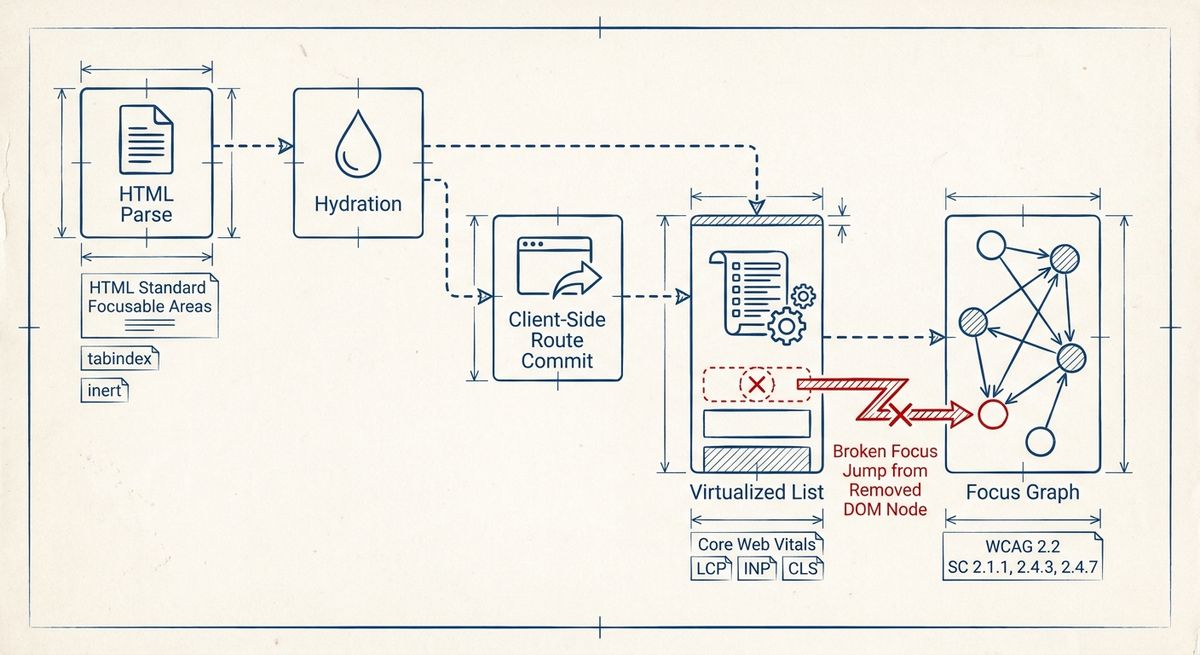
The problem is not that performance and accessibility are inherently opposed. The precise problem is that common speed techniques change when, where, and whether interactive elements exist in the document, while keyboard navigation is defined over the document’s current focusable areas. A page can meet common performance thresholds for Largest Contentful Paint, Interaction to Next Paint, and Cumulative Layout Shift while still presenting a tab sequence that skips controls, lands on invisible elements, loses focus after route changes, or traps focus inside transient UI. This is a systems mismatch: performance metrics measure rendering, responsiveness, and visual stability; keyboard navigation depends on DOM continuity, semantics, focus algorithms, and event handling.
The fastest websites are often built from partial HTML, deferred JavaScript, client-side routing, lazy components, virtualized lists, skeleton states, and aggressive CSS resets. Each choice can be valid in isolation. The failure appears at integration boundaries: a link is rendered as a non-focusable element until hydration; a menu appears visually before its keyboard behavior is bound; a virtual list removes the focused row from the DOM; a route transition replaces the main region without moving focus; a focus outline is suppressed to match a visual system. The article therefore solves a diagnostic problem: it explains why high measured speed can coexist with poor keyboard operation, and how to design a minimal architecture that preserves both.
How it works
At the systems level, keyboard navigation is produced by several layers. The HTML Standard defines focusable areas, the sequential focus navigation order, and the effect of the `tabindex` attribute. User agents maintain the currently focused area and move it in response to keyboard input such as Tab and Shift+Tab. The accessibility tree is derived from host-language semantics, WAI-ARIA roles and states, and accessible-name computation. Rendering and scripting then affect whether an element is visible, hit-testable, disabled, inert, or removed. A performance optimization can therefore break navigation without throwing an error, because it may still produce valid JavaScript and valid pixels while changing the focus graph.
Performance-oriented architectures frequently split the page into independently loaded islands. Server-rendered HTML may arrive first, followed by hydration code that attaches listeners later. If a button is emitted as a real `button`, it remains focusable before hydration; if it is emitted as a `div` with a later click handler, it is not a keyboard control until additional code runs. Client-side routers also alter the document without a full page load. Unless the router intentionally manages focus, the browser may leave focus on an element that has been removed, move focus to the body, or keep the visible position while assistive technology still reports stale context.
Virtualization creates a subtler conflict. To improve rendering cost, a list may keep only visible rows in the DOM. That reduces layout and paint work, but the sequential focus order can no longer include items that do not exist. If the focused row is recycled as the user scrolls, focus may jump to a different item with the same DOM node. Lazy disclosure widgets have a related failure: a panel is visually introduced, but focusable descendants are mounted later, so keyboard users encounter a timing-dependent order. In these cases the website is fast because less DOM exists, and the navigation is poor for the same reason.
What the standard says
The current HTML Standard, maintained by WHATWG, is the core reference for focus. It defines `tabindex`, focusable areas, sequential focus navigation, and activation behavior. The specification requires native controls such as `button`, `input`, `select`, `textarea`, and anchors with `href` to participate in focus and activation according to their semantics. Positive `tabindex` values create an explicit ordering before elements with `tabindex` zero, which is conforming but fragile because it disconnects keyboard order from document order. The `inert` attribute is current HTML, not a legacy pattern; when a subtree is inert, user agents must prevent its nodes from being focused or found by sequential focus navigation.
WCAG 2.2 is the current W3C Recommendation in the WCAG line; WCAG 2.1 was superseded, while its success criteria remain included unless changed. The relevant requirements are direct. Success Criterion 2.1.1 Keyboard requires all functionality to be operable through a keyboard interface, except where the underlying function requires path-dependent input. Success Criterion 2.1.2 No Keyboard Trap requires that focus can be moved away using only the keyboard, or that the method is documented. Success Criterion 2.4.3 Focus Order requires an order that preserves meaning and operability. Success Criterion 2.4.7 Focus Visible requires a visible focus indicator.
WCAG 2.2 added focus-indicator criteria that are easy to miss in performance-led CSS systems. Success Criterion 2.4.11 Focus Not Obscured (Minimum) requires that a focused component is not entirely hidden by author-created content. Success Criterion 2.4.12 Focus Not Obscured (Enhanced) is stricter. Success Criterion 2.4.13 Focus Appearance defines measurable properties for the focus indicator at Level AAA. These criteria matter for sticky headers, cookie banners, drawers, and virtual keyboards because a page can respond quickly to input while the active element is covered. For name and role, WAI-ARIA 1.2 and Accessible Name and Description Computation 1.2 define how roles, states, properties, and names are exposed when native HTML is insufficient.
Trade-offs
The measurable trade-off is that web performance metrics and keyboard-access metrics observe different things. Current Core Web Vitals use Largest Contentful Paint, Interaction to Next Paint, and Cumulative Layout Shift. First Input Delay was replaced by Interaction to Next Paint as a Core Web Vital in March 2024, so FID should not be treated as the current responsiveness target. The documented thresholds are LCP at 2.5 seconds or less for a good experience, INP at 200 milliseconds or less for a good experience, and CLS at 0.1 or less for a good experience, measured at the 75th percentile of page views in the public guidance for those metrics.
None of those thresholds checks whether Tab reaches every control, whether focus order follows reading order, whether a modal returns focus to its invoker, or whether a custom element has an accessible name. A page can improve LCP by streaming the hero region early while deferring the navigation menu behavior. It can improve INP by reducing main-thread work while replacing native controls with lighter custom nodes that lack keyboard activation. It can improve CLS by reserving space for panels while still mounting focusable descendants late. The optimization is measurable; the regression is also measurable, but with a different instrumentation model.
Useful keyboard measurements include the count of tabbable elements in DOM order, the delta between visual order and focus order, the number of focusable descendants inside an `aria-hidden` or `inert` region, the number of route transitions that move focus to a stable heading or main landmark, and whether the active element remains connected after DOM updates. These are not replacements for human review, because WCAG conformance includes meaning and operability, but they make failures observable in continuous tests. The trade-off is therefore not speed versus accessibility; it is metric coverage versus user-agent behavior that was not included in the performance budget.
Failure modes
A common failure mode is the non-native control. A `div` or `span` with a click listener is not automatically focusable, does not activate with Space and Enter like a `button`, and does not expose the same semantics. Diagnosis starts by inspecting the Accessibility Object Model as exposed in browser developer tools: the role, name, states, and focusability should match the intended control. Another failure is positive `tabindex`, which often appears after components are assembled independently. It is diagnosed by walking the page with Tab and comparing the sequence with DOM order; positive values should be treated as a structural smell except in narrowly controlled composite widgets.
Focus loss after client-side navigation is also frequent. The symptom is that the visual content changes but the keyboard user remains at the old control, the document body, or an element no longer connected to the document. It is diagnosed by logging `document.activeElement` before and after route commits and checking whether it is connected with `isConnected`. Correct behavior usually moves focus to a stable page heading with `tabindex="-1"` or to the `main` landmark, depending on the navigation model. For dialogs, diagnosis includes verifying that focus moves into the dialog, cannot escape while modal, and returns to the invoking control when the dialog closes.
CSS can break navigation without changing the DOM. `outline: none` removes the default focus indicator unless a replacement is provided. `display: contents` can affect accessibility exposure inconsistently for some roles and browser combinations, so it should be tested rather than assumed harmless. Fixed headers and overlays can obscure the active element, implicating WCAG 2.2 Focus Not Obscured. Virtualization failures are diagnosed by focusing an item, scrolling until it is recycled, and checking whether the same logical item remains active. Automated tools can find missing names and focusable hidden content, but they cannot fully determine whether the focus order preserves meaning.
A minimal implementation
A correct minimal implementation begins with durable HTML. Navigation uses anchors with `href`; actions use `button`; form fields use native inputs with associated `label` elements; page structure uses `header`, `nav`, `main`, headings, and lists where appropriate. Interactive content that is not yet usable should not be focusable. If a region is unavailable during a transition, `inert` is preferable to ad hoc `tabindex="-1"` on many descendants because the HTML processing model defines inert subtree behavior. If JavaScript has not loaded, the initial HTML should still provide the essential route, form, or disclosure state rather than exposing inert visual controls.
For a modal dialog, the minimal current pattern is a native `dialog` element opened with `showModal()` when browser support and design constraints allow it, with an accessible name supplied by a visible heading referenced from `aria-labelledby` or by another valid naming mechanism. Focus should move to an appropriate element inside the dialog when it opens, background content should not be reachable, Escape behavior should be considered according to the user-agent dialog model, and focus should return to the invoker on close. For custom dialogs, WAI-ARIA 1.2 supplies `role="dialog"` and `aria-modal="true"`, but ARIA does not add keyboard behavior; scripts must implement it.
For client-side routing, the minimal rule is to make route commits explicit focus events. After new content is committed, focus a stable heading or the `main` element with `tabindex="-1"`, then remove no longer needed temporary attributes only if doing so will not strand focus. For virtualized lists, keep the focused item mounted, use roving `tabindex` within a composite widget when the pattern requires arrow-key navigation, and expose set size and position only when they are accurate. The minimal performance-compatible rule is simple: optimize bytes, rendering, and scheduling, but never make the focus graph a side effect of what happened to be mounted this frame.