Fintech homepages and assistive technology
Overview
Our measurement for the primary sector is: “Fintech (n=28 of 35 sampled, 20% refused an automated request, measured 2026-07-29): median server response 294 ms; median HTML 545 KB; skip link present on 21%; main landmark on 82%; median alt-text coverage 75%; median trackers 1; median third-party domains 10; consent mechanism on 43%.” The method was one HTTPS GET per homepage with no JavaScript executed, so the figures describe the server-delivered document, not the post-hydration DOM seen after client-side execution.
The precise problem is not whether a payments platform homepage “has accessibility” in the abstract. The problem is whether its initial HTML gives assistive technology enough stable structure to enter the page, skip repeated navigation, identify the main content region, compute useful names for images and controls, and avoid being trapped behind consent or tracking-related overlays. In the Fintech sample (n=28 of 35 sampled, 20% refused an automated request, measured 2026-07-29), the coexistence of 82% main landmark presence and 21% skip link presence is the central architectural signal: many documents expose a destination, but far fewer expose a keyboard shortcut to reach it.
How it works
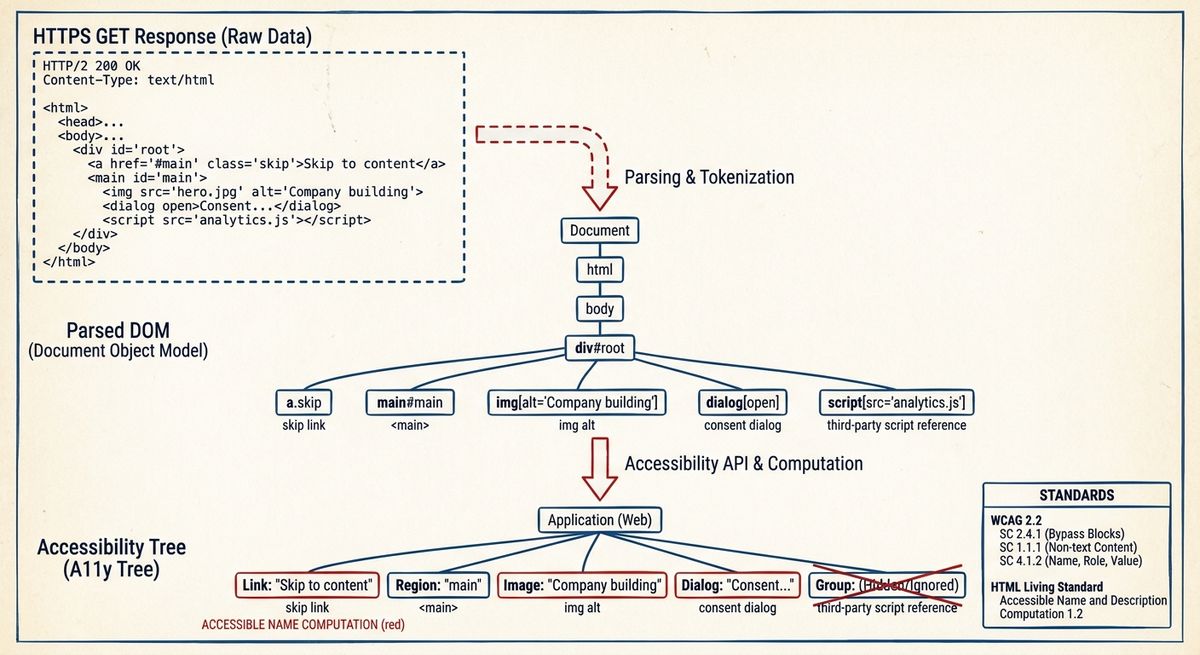
Assistive technology usually consumes an accessibility tree derived from the parsed DOM, CSS box tree, platform accessibility mappings and browser algorithms. HTML elements such as <main>, <nav>, <button>, <a>, <img> and form controls map to roles, states and names through specifications including HTML Accessibility API Mappings and Accessible Name and Description Computation 1.2. A single no-JavaScript GET does not execute client code, but it can still reveal whether the server response contains semantic landmarks, image alternatives, script references, third-party domains and consent markup before hydration changes the tree.
For a payments platform homepage, this matters because the first interaction path often includes navigation, authentication entry points, product descriptions, support links, legal notices and sometimes region or cookie choices. A skip link is normally a visually hidden anchor that becomes visible on focus and targets the main content container. A main landmark is usually <main id="main"> or role="main". Alternative text is exposed through the img alt attribute and then processed by the accessible-name algorithm. In the Fintech sample (n=28 of 35 sampled, 20% refused an automated request, measured 2026-07-29), median alt-text coverage was 75%, which means the initial HTML commonly contains some image naming but leaves a material diagnostic surface for missing or empty alternatives.
What the standard says
The current baseline is WCAG 2.2, a W3C Recommendation, not WCAG 2.0 alone. Several success criteria are directly relevant. SC 2.4.1 Bypass Blocks requires a mechanism to bypass blocks of content repeated on multiple web pages; a skip link is the common minimal mechanism, although a proper heading structure or landmarks can also contribute when supported by the user agent and assistive technology. SC 1.3.1 Info and Relationships requires structure and relationships conveyed through presentation to be programmatically determined or available in text. SC 1.1.1 Non-text Content requires a text alternative for non-text content, except for documented cases such as decoration, CAPTCHA and sensory content.
HTML Living Standard defines the main element as representing the dominant contents of the body of a document, and ARIA in HTML constrains how native semantics and ARIA roles should be combined. The accessible name is not an implementation guess: Accessible Name and Description Computation 1.2 defines the ordered algorithm used by user agents. WCAG 2.2 also removed SC 4.1.1 Parsing, which was present in earlier WCAG versions; current analysis should therefore focus on exposed name, role and value under SC 4.1.2, not on the superseded parsing criterion as an independent requirement. Consent components are not exempt: if a consent mechanism appears, WCAG 2.1.2 No Keyboard Trap, 2.4.3 Focus Order, 2.4.7 Focus Visible and 4.1.2 Name, Role, Value still apply.
Trade-offs
The measurable trade-off in the Fintech sample (n=28 of 35 sampled, 20% refused an automated request, measured 2026-07-29) is that semantic exposure is uneven rather than absent: main landmark on 82%, skip link present on 21%, median alt-text coverage 75%, consent mechanism on 43%, median trackers 1 and median third-party domains 10. A main landmark is cheap in markup terms, but it does not replace a bypass mechanism for keyboard users who start at the top of a document. Conversely, a skip link with a broken target can satisfy neither keyboard efficiency nor programmatic navigation, even if it is visible on focus.
Payload and dependency choices also interact with accessibility diagnostics. In the Fintech sample (n=28 of 35 sampled, 20% refused an automated request, measured 2026-07-29), median server response was 294 ms and median HTML was 545 KB. WCAG does not set a kilobyte threshold for HTML size, and the measurement does not establish user-perceived performance. It does show how much structure is delivered before JavaScript: the larger and more dependency-rich the initial document, the more likely it is to include duplicated navigation, hidden templates, tracking markup or consent markup that can accidentally enter the accessibility tree. The refusal rate is also a data-quality boundary: Fintech had 20% refused automated request, so this is a measurement of reachable homepages in the sample, not a claim about every payments platform.
Failure modes
Common failure modes are detectable from the same primitives. A page can include <main> but omit a focusable skip link, which leaves screen reader landmark navigation possible but makes repeated keyboard traversal inefficient. A page can include a skip link whose href target is absent, duplicated or not focusable after navigation. Images can have present but unhelpful alt values, such as filenames, repeated slogans or text that duplicates adjacent copy. Decorative images should usually use alt="" so they are ignored; informative images need meaningful alternatives. The Fintech sample (n=28 of 35 sampled, 20% refused an automated request, measured 2026-07-29) had median alt-text coverage 75%, but coverage alone cannot verify text quality.
Consent and third-party integration create a second class of failure. In the Fintech sample (n=28 of 35 sampled, 20% refused an automated request, measured 2026-07-29), consent mechanism on 43%, median trackers 1 and median third-party domains 10. A consent layer can be correctly exposed as a dialog with an accessible name, managed focus, keyboard-operable controls and a restorable focus point; or it can become an unlabeled overlay that precedes the page in tab order and hides the main landmark. Diagnosis should use the browser accessibility tree, not only DOM search. Current browser tooling exposes computed roles and names, while automated rules can flag missing landmarks, missing alt attributes, duplicate IDs, contrast failures and unlabeled controls; manual keyboard traversal is still required for focus order and traps.
A minimal implementation
A correct minimal homepage implementation starts with server-rendered structure. The first focusable control is an anchor such as “Skip to main content” with href="#main"; its target is a single <main id="main"> containing the dominant content. Repeated navigation is inside <nav aria-label="Primary"> or an equivalent labelled navigation region. Informative images have concise alt text; decorative images have alt=""; icon-only buttons have an accessible name supplied by visible text, aria-label or aria-labelledby according to Accessible Name and Description Computation 1.2. The document uses native buttons and links before ARIA substitutions, because native controls already expose role, keyboard behavior and state mappings.
The minimal consent pattern is similarly small. If the component is not modal, it should not claim modal behavior. If it is modal, role="dialog" or the native dialog element can be used with an accessible name, focus moved into the dialog, inert background content where supported, Escape behavior when appropriate, and focus restored after dismissal. The homepage should remain coherent when JavaScript fails: the server HTML should still expose the main landmark, bypass link and essential alternatives. Against the Fintech measurement (n=28 of 35 sampled, 20% refused an automated request, measured 2026-07-29), the smallest meaningful improvement is not adding more client code; it is making the already common main landmark reachable by a standards-conformant bypass mechanism and ensuring that consent markup does not obscure the accessibility tree.