Developer tool homepages for non-browser clients
Overview
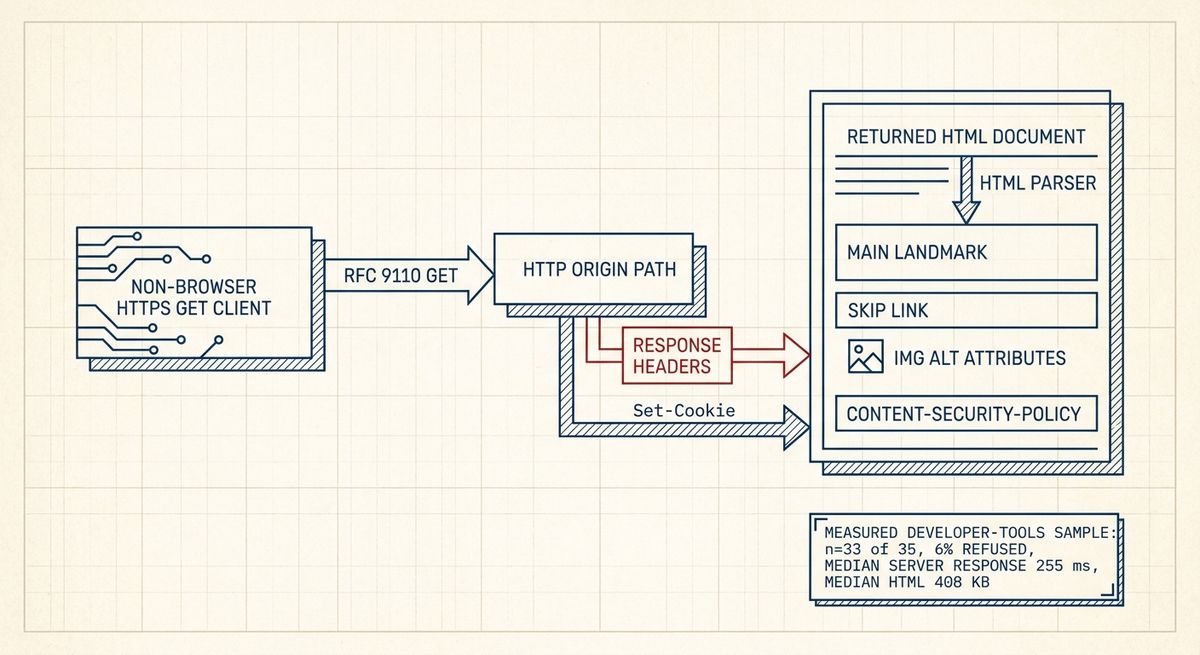
Our measurement is about the first contract a homepage offers to a machine client: one HTTPS GET, no JavaScript execution, and no browser-only recovery path. For the primary sector, our measurement found: “Developer tools (n=33 of 35 sampled, 6% refused an automated request, measured 2026-07-29): median server response 255 ms; median HTML 408 KB; skip link present on 30%; main landmark on 85%; median alt-text coverage 78%; median trackers 1; median third-party domains 10; consent mechanism on 48%”. For the adjacent B2B comparison set, our measurement found: “B2B SaaS (n=33 of 35 sampled, 6% refused an automated request, measured 2026-07-29): median server response 351 ms; median HTML 571 KB; skip link present on 45%; main landmark on 88%; median alt-text coverage 65%; median trackers 2; median third-party domains 12; consent mechanism on 67%”.
The precise problem solved by measuring what developer tool homepages ship to a non-browser client is separation of the baseline document from the browser application. A modern homepage can be a document, a hydration target, a consent boundary, an accessibility surface, and a bot-classification input at the same time. A single GET cannot describe the full interactive page, but it can reveal whether the origin returns a parseable HTML document, whether basic landmarks and bypass mechanisms exist before script, how much markup is transferred, and whether third-party relationships are visible in the initial response.
The refusal rate matters because it defines the boundary of the evidence. In the same measurement set, “Refused automated request %: B2B SaaS 6, AI platforms 6, Developer tools 6, Healthcare 17, Fintech 20, DTC ecommerce 47, Retail chains 51 (best first)”. Developer tools and B2B SaaS therefore have low refusal in this measurement, while sectors with high refusal, especially DTC ecommerce and retail chains, are not representative of their whole industries under this method.
How it works
At systems level, this measurement exercises the HTTP origin path rather than the browser runtime. The client opens a TLS-protected connection, sends an HTTP GET for the homepage, follows the server’s response semantics, and records the response time and returned HTML without executing scripts. Under RFC 9110, GET is a safe method: the specification defines it as a request to transfer a current selected representation of the target resource, not as a request to perform a state-changing action. That is why a homepage GET is a suitable probe of the public representation the server elects to send to automated clients.
The initial document is then inspected as HTML, not as a fully rendered Document Object Model after client code runs. That distinction is central. If navigation landmarks, image alternative text, consent controls, or tracking endpoints appear only after a script bundle runs, they are absent from this measurement. Conversely, server-rendered HTML, static generation, edge HTML rewriting, and middleware-injected tags are visible because they exist in the bytes returned by the GET.
The developer-tools row should therefore be read as a baseline delivery profile, not a complete user-experience score. In “Developer tools (n=33 of 35 sampled, 6% refused an automated request, measured 2026-07-29)”, the median server response was “255 ms” and the median HTML was “408 KB”. Those values describe the pre-JavaScript server path and transfer artifact; they do not include image downloads, stylesheet blocking, hydration cost, interaction latency, or Core Web Vitals field data.
What the standard says
The relevant HTML rule is the WHATWG HTML Standard’s definition of document structure and sectioning. The `main` element represents the dominant contents of the `body` of a document. The same standard restricts it to content that is not repeated across a set of documents, such as site navigation, headers, footers, or search forms. ARIA in HTML maps `main` to the landmark role unless semantics are overridden in ways the specification disallows or discourages. In our measurement, “Developer tools (n=33 of 35 sampled, 6% refused an automated request, measured 2026-07-29)” had “main landmark on 85%”, while “B2B SaaS (n=33 of 35 sampled, 6% refused an automated request, measured 2026-07-29)” had “main landmark on 88%”.
Skip links connect the measurement to WCAG 2.2, which is the current W3C Recommendation in the WCAG 2 line. WCAG 2.2 Success Criterion 2.4.1, Bypass Blocks, requires a mechanism to bypass blocks of content repeated on multiple Web pages. A visible-on-focus link to `#main`, paired with a valid target such as `<main id="main">`, is a common conforming technique. The measurement found “Skip link coverage %: Healthcare 62, DTC ecommerce 55, B2B SaaS 45, Retail chains 41, Developer tools 30, Fintech 21, AI platforms 18 (best first)”. For “Developer tools (n=33 of 35 sampled, 6% refused an automated request, measured 2026-07-29)”, the figure was “skip link present on 30%”.
Alternative text is governed by the HTML Standard and the Accessible Name and Description Computation 1.2. For `img`, the `alt` attribute supplies text alternative semantics, but the correct value depends on function: informative images need equivalent text, decorative images normally use empty `alt`, and functional images need the function rather than a visual description. Our metric is coverage, not correctness. “Developer tools (n=33 of 35 sampled, 6% refused an automated request, measured 2026-07-29)” had “median alt-text coverage 78%”; that does not prove that the alternatives satisfy WCAG 2.2 Success Criterion 1.1.1, Non-text Content.
Consent mechanisms touch a different standards and protocol layer. The measurement records visible presence in the initial response, not legal sufficiency. On the protocol side, cookies are governed by RFC 6265 as updated by RFC 6265bis work in the IETF HTTPbis working group, including attributes such as `Secure`, `HttpOnly`, `SameSite`, `Path`, and `Domain`. In the measured homepage HTML, “Developer tools (n=33 of 35 sampled, 6% refused an automated request, measured 2026-07-29)” showed “consent mechanism on 48%”, while “B2B SaaS (n=33 of 35 sampled, 6% refused an automated request, measured 2026-07-29)” showed “consent mechanism on 67%”.
Trade-offs
The measurable trade-off in the developer-tools row is that the initial document is relatively fast among the supplied sectors while still carrying a substantial amount of HTML. The cross-sector ordering states: “Median server response ms: DTC ecommerce 196, Developer tools 255, AI platforms 282, Fintech 294, Retail chains 297, Healthcare 348, B2B SaaS 351 (best first)”. For “Developer tools (n=33 of 35 sampled, 6% refused an automated request, measured 2026-07-29)”, the same row gives “median server response 255 ms; median HTML 408 KB”. For “B2B SaaS (n=33 of 35 sampled, 6% refused an automated request, measured 2026-07-29)”, it gives “median server response 351 ms; median HTML 571 KB”.
A larger server-rendered document can improve non-browser legibility because more content, landmarks, and links exist before script. It can also increase transfer size, parsing cost, cache variation, and the chance that stale build artifacts leak into the public document. A smaller document can be cheaper to transmit, but if it is only an empty application shell, the non-browser representation loses headings, anchors, text alternatives, and policy surfaces. The measurement’s “median HTML 408 KB” for “Developer tools (n=33 of 35 sampled, 6% refused an automated request, measured 2026-07-29)” is therefore neither good nor bad by itself; its quality depends on whether those bytes contain useful semantic structure.
Third-party dependency count is another trade-off exposed before JavaScript runs. In the developer-tools row, “Developer tools (n=33 of 35 sampled, 6% refused an automated request, measured 2026-07-29)” had “median trackers 1; median third-party domains 10”. The adjacent SaaS row recorded “B2B SaaS (n=33 of 35 sampled, 6% refused an automated request, measured 2026-07-29): median trackers 2; median third-party domains 12”. These figures do not state that a domain is harmful; they show the breadth of externally referenced infrastructure present in the initial representation, with implications for DNS resolution, connection coalescing, Content Security Policy, and failure isolation.
Failure modes
The first failure mode is over-classification of non-browser clients. A homepage can return HTTP 403 Forbidden, HTTP 429 Too Many Requests, a challenge interstitial, or a document that depends on client-side attestation before any content is visible. RFC 9110 defines the status-code classes and semantics, but it does not require an origin to send the same representation to every client. In this measurement, “Developer tools (n=33 of 35 sampled, 6% refused an automated request, measured 2026-07-29)” had “6% refused an automated request”, the same refusal figure recorded for “B2B SaaS (n=33 of 35 sampled, 6% refused an automated request, measured 2026-07-29)”. Diagnosis begins by preserving the status code, response headers, TLS outcome, redirect chain, and final body.
The second failure mode is semantic content that exists only after hydration. A non-browser GET may receive a root node, script tags, and little else. That pattern is diagnosable by parsing the returned bytes with the HTML parsing algorithm rather than inspecting a browser screenshot. Engineers should check whether the first response contains a single `main` landmark, whether the skip-link target exists in the same document, whether headings form a usable outline for assistive navigation, and whether meaningful images have `alt` attributes before any script runs.
The third failure mode is contradictory policy metadata. Common examples include a consent banner in the HTML while tracking endpoints are already referenced, a restrictive Content Security Policy that blocks required first-party scripts, or cache headers that vary by cookie in a way that prevents shared caching. The relevant headers are concrete: `Content-Security-Policy`, `Set-Cookie`, `Cache-Control`, `Vary`, `Referrer-Policy`, and `Permissions-Policy`. Diagnosis should compare the raw response with a script-enabled browser trace, because this measurement intentionally observes only the raw response.
A minimal implementation
A correct minimal implementation is a homepage that remains a useful HTML document when fetched by a generic HTTPS client. The server should return an HTTP 200 response for the canonical homepage, with `Content-Type: text/html; charset=utf-8`, stable redirects, and cache directives appropriate to the document’s personalization level. The body should include a document title, one primary `main` region, a bypass link that becomes visible on keyboard focus, ordinary anchors for core navigation, and meaningful text in the initial HTML rather than relying on script to create all primary content.
The minimal accessibility structure is small. Place `<a class="skip-link" href="#main">Skip to main content</a>` before repeated navigation, then use `<main id="main">` around the page-specific content. Provide `alt=""` for decorative images and useful alternatives for informative or functional images. Do not use ARIA to replace native HTML where the native element already has the required semantics; ARIA in HTML and the WAI-ARIA specifications both warn against changing native semantics without need.
The minimal dependency model is also explicit. Keep third-party domains out of the first document unless they are needed for the baseline page, set cookies only with documented attributes, and ensure consent UI is not merely a script-injected afterthought if the first response already references tracking endpoints. If bot protection is deployed, make the fallback observable: a clear status code is easier to diagnose than an opaque interstitial masquerading as the homepage. That model aligns the non-browser contract with the standards surface: HTTP transfers a selected representation, HTML exposes document semantics, WCAG 2.2 defines bypass and non-text-content requirements, and cookie and policy headers state the browser-side constraints.